
Using Chat Mode to Edit Images
Chat Mode lets you refine and edit images through conversation. Simply upload an image and describe the changes you want to make, and the AI will apply them.
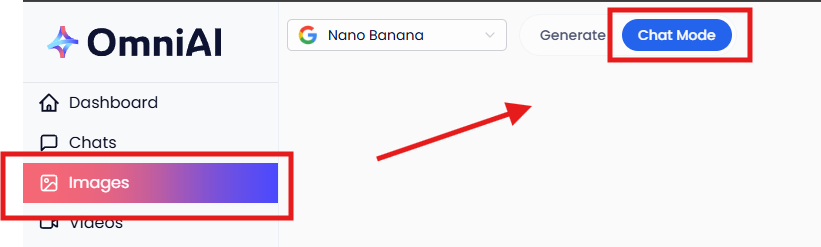
1. Open Chat Mode: Click Images in the main navigation menu, then select Chat Mode at the top of the page.
2. Set Your Aspect Ratio: Choose the aspect ratio you'd like before adding your image, as this determines the canvas your image will work within.
3. Add Your Image: You can either upload a new image from your device or select a previously generated image from your Omni AI library.
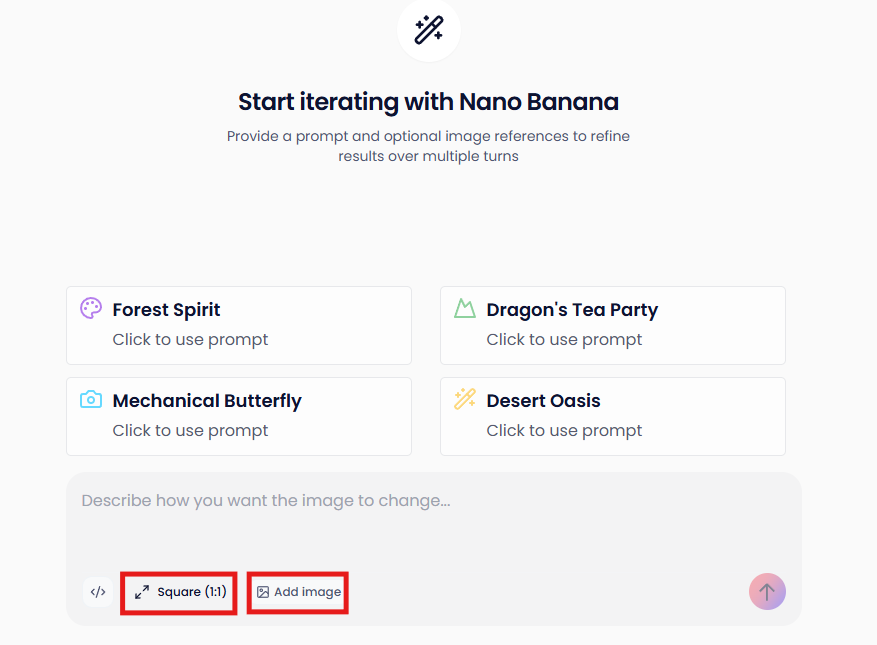
4. Start Chatting: Once your image is loaded, describe the changes you'd like in the chat box. Some examples of what you can ask for:
- Change a person's hair colour or style
- Swap out or alter the background
- Adjust lighting, colours, or mood
- Add or remove objects from the scene
5. Iterate Until You're Happy: If the first result isn't quite right, just keep going - describe what needs adjusting and the AI will refine it further. Chat Mode is designed for back-and-forth, so don't be afraid to experiment.