
Help Center
Go back to application
Help Center
Go back to application
What is Omni AI?
Chats
Selecting an AI ModelWhich AI Model is best?
Images
Image generationStored Images
Personas
What is a Persona?Selecting a PersonaCreating a new PersonaEditing a PersonaDeleting a PersonaThe Persona Creation Prompt Template
Predefined personas
Omni AI AssistantSocial Media Content GeneratorBranding ExpertDigital Advertising AssistantCreative Writing AssistantEducational Content CopywriterVideo ExpertSales Copywriter
Prompts
What is Prompting?Omni AI Simple Guide to Effective Prompting Your Prompt LibraryAdding a Prompt to your Prompt Library
Billing and Subscriptions
How do I access my Omni AI account?How do I reset my password?What is a Credit?How many Credits will my query use?
ClickTech HUB
What is the ClickTech HUB?
FAQs
Which AI Models are best for general purpose writing and reasoning?Which AI Models are best for tasks where speed and / or cost are the priority?Which AI Models are best for image understanding and vision?Which AI Models are best for image generation and creation?Which AI Models are best for video generation and creation?Which AI Models are best for audio and speech?Contact us!

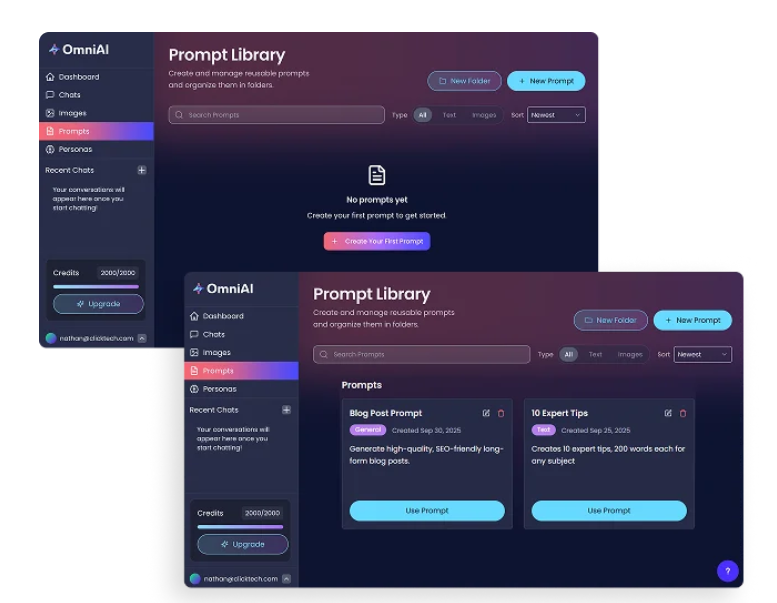
Your Prompt Library

Store all your created or discovered prompts in your Prompt Library for easy access - saving you time as your collection grows

Simply click the ‘Use Prompt’ button next to any stored prompt to run it

Both text and image prompts can be saved. and organize them into folders for better management


Was this article helpful?

Powered by Product Fruits